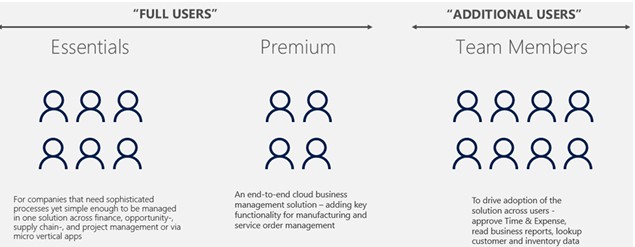
Business Central licencing is one of the most frequently misunderstood aspects of the platform for businesses considering it for the first time. The headline structure is straightforward — two user licence types, two subscription tiers — but the practical implications of choosing between them are significant, and the right choice depends on what your business actually needs to do with the system.
This post explains the Essentials and Premium tiers clearly, covers the Team Member licence for occasional users, and helps businesses work out which combination is right for them.
The Two Main Subscription Tiers
Business Central is offered in two tiers: Essentials and Premium. Both are per-user monthly subscriptions. Critically, the tier is set at the company level — each Business Central company is configured as either Essentials or Premium experience — and that setting applies to all users who access it. You cannot mix Essentials and Premium full users within the same company.
Business Central Essentials covers the core financial and operational functionality that most businesses need. This includes the full general ledger, accounts payable, accounts receivable, fixed assets, bank reconciliation, sales order management, purchase order management, inventory management, project management, and the full suite of reporting and Power BI integration. For the vast majority of businesses implementing Business Central for the first time, Essentials covers everything required.
Business Central Premium adds two capability areas not included in Essentials: manufacturing and service management. Manufacturing covers production orders, bills of materials, routings, capacity planning, and assembly management. Service management covers service contracts, service orders, service items, and resource allocation for field service operations.
If your business requires manufacturing or service management, the company must be set to Premium experience — and every full user who accesses that company will need a Premium licence, regardless of whether their day-to-day role involves manufacturing or service functions. A finance user or a sales user in a Premium company still requires a Premium licence. This is a common source of confusion and has a direct impact on licensing costs.
If your business does not do manufacturing or service contract management, there is no reason to pay for Premium, and all full users can be licensed on Essentials.
The Team Member Licence
Business Central also offers a Team Member licence at a lower price point, designed for users who need limited access to the system — primarily to read data, approve requests, and perform a small number of specific tasks — rather than full operational access.
Team Member users can read any Business Central data, approve or reject purchase orders and invoices submitted to them through workflow, submit timesheets and expenses, and perform a small set of defined write actions. They cannot create transactions or access the full range of Business Central functionality.
The Team Member licence is genuinely useful for organisations where a significant number of people need to interact with Business Central occasionally — approving their team’s expense claims, reviewing project status, or viewing customer account information — but do not need to create or process transactions themselves. For a business with ten full users and fifty managers who occasionally approve invoices, the ability to licence those fifty people as Team Members rather than full users represents a meaningful cost saving. Importantly, Team Members can access a Premium company without requiring a Premium licence — the full-user Premium requirement applies only to full users.
Online vs On-Premise
Business Central is available as a cloud (SaaS) subscription or as an on-premise licence. For the overwhelming majority of businesses implementing Business Central today, the cloud subscription is the right choice. It eliminates server infrastructure costs, provides automatic update management, and includes disaster recovery and data residency within Microsoft’s Azure infrastructure.
On-premise licences are available for businesses with specific regulatory or technical reasons that prevent cloud deployment — certain government or defence contracts, for example. For most commercial businesses, on-premise provides no meaningful advantage over the cloud subscription and adds infrastructure complexity and cost.
What Licencing Costs in Practice
Microsoft publishes list prices for Business Central licences, and these are the starting point for a cost calculation. However, the total monthly subscription cost for a given organisation depends on the mix of Essentials, Premium, and Team Member users, and Microsoft revises pricing periodically. Finsys Apps provides clients with current pricing during the scoping process and can model different licence combinations to identify the most cost-effective configuration for a specific user population.
One important consideration for cost planning: Business Central licencing is in addition to the implementation cost. The implementation is a one-off project cost; the licencing is an ongoing monthly subscription. Both need to be in the budget before a project begins.
Getting the Licence Mix Right
Choosing the wrong licence mix has a direct financial impact. The most common mistake is underestimating the cost of Premium: because the Premium experience applies to the whole company, any business that needs manufacturing or service management must licence all of its full users at the Premium level — not just those working in those specific functions. This can significantly increase the total licencing cost compared to an Essentials deployment, and it is essential to factor this in during the planning phase.
At Finsys Apps, we work through the licence requirements with each client during the scoping phase, mapping their user population to the right licence type based on what the business actually needs to do in the system. If you would like help working out the right licence mix for your business, get in touch.