Bank reconciliation is one of those finance tasks that exists in every business but is rarely examined critically. The process — matching transactions in the accounting system against transactions on the bank statement — is fundamental to the accuracy of financial records, but the way most businesses do it involves a significant amount of manual effort that delivers no analytical value. It is pure administration.
This post examines what manual bank reconciliation actually involves, how automated reconciliation via a bank feed integration changes it, and the practical considerations for businesses choosing between the two approaches in Business Central.
Manual Bank Reconciliation in Business Central
Business Central has a bank reconciliation module built in, and it is a proper one — not simply a comparison of two spreadsheet columns. The standard process involves importing a bank statement file (typically in CSV or MT940 format exported from online banking), loading it into the Business Central payment reconciliation journal, and then matching each bank transaction to the corresponding open ledger entries.
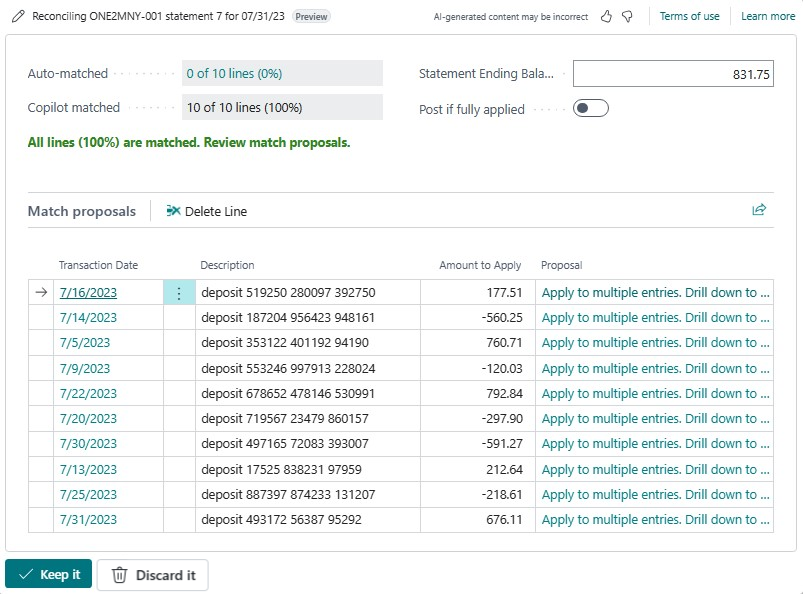
Business Central’s matching algorithm does some of this automatically — it attempts to match bank transactions to open entries based on amount, date, and transaction reference — and for businesses with straightforward payment patterns and clean customer reference data, the automatic match rate can be reasonable. But the process still requires someone to log into online banking, download the statement file, upload it to Business Central, review the matches, manually allocate unmatched items, and post the journal.
For a business with a single bank account and moderate transaction volume, this process might take thirty to sixty minutes each day. For a business with multiple bank accounts, high transaction volumes, or customers who pay inconsistently (combined payments, partial payments, payments without references), the daily reconciliation can consume several hours.
Automated Bank Reconciliation via Bank Feed Integration
Tools like Softera Bankfeed and Yavrio replace the manual statement download-and-import cycle with a direct connection between the bank account and Business Central via open banking APIs. Once connected, transactions appear in Business Central’s payment reconciliation journal in real time — or on a scheduled basis throughout the day — without any manual action required from the finance team.
The recognition engine in these tools goes further than Business Central’s standard matching. Rather than matching purely on amount and date, they use the full transaction data — payment reference text, payer bank details, amount, and date — to identify which customer or supplier made the payment and which open invoice it relates to. For customers who consistently pay invoices with a standard reference, the automatic recognition rate can exceed ninety-five per cent.
The practical result is that the finance team arrives each morning to find the bank journal pre-populated, with the majority of transactions already matched and ready to post. The reconciliation task reduces to reviewing the automatic matches, allocating the small number of exceptions, and posting — a process that takes minutes rather than hours.
Which Approach Is Right for Your Business?
The right approach depends on transaction volume, the number of bank accounts you operate, and the consistency of your customers’ payment behaviour.
For a small business with a single bank account and a predictable customer base, Business Central’s standard bank reconciliation module is entirely adequate. The manual import process is manageable, and the additional cost and configuration of a bank feed integration may not be justified.
For a business with high transaction volumes, multiple bank accounts, or customers who pay in ways that make manual matching time-consuming — combined payments, split invoices, payments without clear references — a bank feed integration typically delivers a return on its cost within the first few months of operation through finance team time savings alone.
For businesses with treasury management requirements — cash flow forecasting, payment run management, or multi-currency cash management — tools like Yavrio provide additional functionality beyond statement import and reconciliation that further justifies the investment.
Implementation Considerations
Getting a bank feed integration to perform at its best requires some preparation. The quality of automatic payment recognition depends on the accuracy and completeness of customer and supplier records in Business Central. If your customer master data contains inconsistent names, missing bank account references, or duplicate records, the recognition engine will struggle to match incoming payments — and the exception rate will be higher than it needs to be.
At Finsys Apps, we review customer and supplier data quality as part of every bank feed implementation, and configure the recognition rules to reflect each client’s specific payment patterns. If you are interested in automating bank reconciliation in Business Central, get in touch to discuss the options.