Business Central Release 28: The AI-Driven ERP Has Arrived
Microsoft’s Business Central 2026 Release Wave 1 — version 28.0 — became generally available on 1 April 2026, and it is, without exaggeration, the most significant release the product has seen in several years. Where the 27.x cycle introduced the concept of autonomous agents and AI-assisted workflows, release 28 is a consolidation play: features move from preview to general availability, the Payables Agent matures into a production-grade tool, long-standing gaps in the core ERP are finally closed, and a genuine migration path opens up from any SQL-based legacy system.
For finance leaders, this is no longer a question of whether Business Central is ready for prime time — it’s a question of how quickly you can move to extract value from it. In this post, we’ll walk through the most impactful changes, what they mean in practice for day-to-day finance operations, and how Finsys Apps is positioned to help both existing Business Central clients adopt these features and new clients migrate from Xero, Sage, AccountsIQ and other legacy platforms.
The Big Picture: What Release 28 Actually Changes
Release 28 covers more than 50 new and updated features across eleven product areas. Rather than attempt a feature-by-feature recital (Microsoft’s own release notes already do that), we’re going to focus on the themes that will materially affect how your finance function operates:
- AI agents and Copilot extend from assistive tools into genuine process automation
- Accounts payable gets a long-overdue overhaul — multi-line matching, drop shipment independence, requisition approvals
- Financial reporting and governance mature into audit-ready capabilities
- A real cloud migration path opens up from any SQL database — including legacy on-premise systems
- Supply chain, quality, and e-commerce features close the gap with specialist best-of-breed tools
1. The Copilot and AI Agent Revolution

The Payables Agent Reaches Maturity
The Payables Agent was introduced as a preview in earlier waves, and with release 28 it steps decisively into general availability territory with meaningful improvements. For finance teams, this is the headline feature.
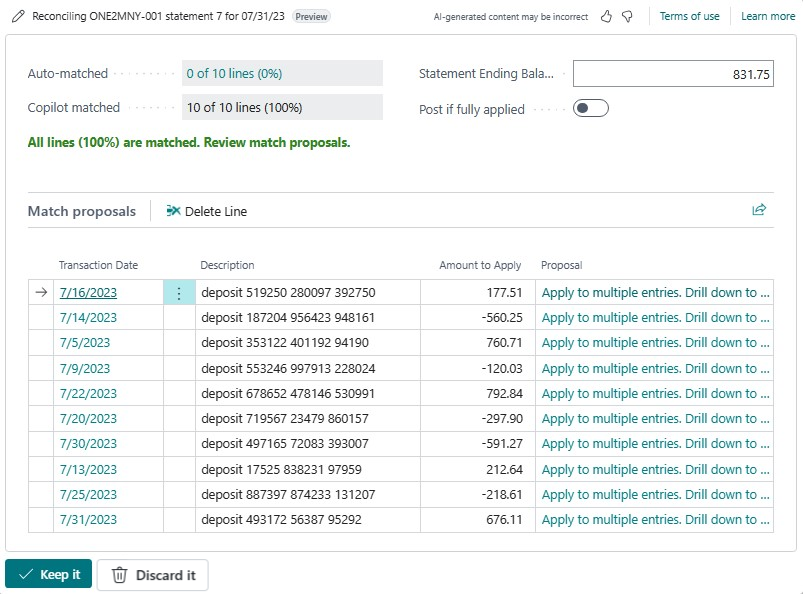
Here’s what it actually does. The Payables Agent monitors a dedicated mailbox for incoming vendor invoices, uses AI to read and interpret the PDF content, identifies the correct vendor (creating a new vendor record if instructed), performs line-level processing by drawing on purchase invoice history, item references, and G/L account mapping, and then produces a Purchase Document Draft for an agent supervisor to review. Where the agent is uncertain — typically when it can’t confidently identify a vendor — it pauses and requests instruction from a human supervisor via the Copilot task pane, then resumes.
The critical point for finance directors to understand is this: the agent is not a “magic button.” It operates within the same security model, permission structure and audit trail as every other Business Central process. Every action it takes is logged, every draft is reviewable, and every posting still requires human approval. But the donkey work — reading the invoice, matching it to a vendor, allocating lines to the right G/L accounts, flagging discrepancies — is handled autonomously.
In release 28, the agent also gains the ability to discover emails in the mailbox that have been processed, giving supervisors far better visibility over what’s happened, and a new dedicated task pane that consolidates work across all agents (Sales Order Agent, Payables Agent, and custom agents) into a single operational view.
What About the Cost?
It would be dishonest to discuss AI agents without addressing the consumption-based billing model, because it’s a genuine change in how you budget for your ERP. Agent capabilities consume Copilot Credits — Microsoft’s unit of AI billing. Based on Microsoft’s published pricing of $0.01 per credit under the pay-as-you-go model, and the illustrative example of a Sales Order Agent processing 100 emails per month, you’re looking at roughly $16–17 per month per 100 documents. Billing events for the Payables Agent specifically are still being finalised at the time of writing, but the order of magnitude is similar.
For context: the fully-loaded hourly cost of a UK-based accounts payable clerk is typically £20–£35 per hour. If the agent saves even two hours of manual invoice entry per week, it pays for itself many times over. Our role at Finsys Apps is to help you model this properly for your volumes, so the business case is grounded in reality rather than vendor optimism.
Custom Agents and AI Resources for ISVs
For organisations with genuinely unique workflows, release 28 introduces AI resources for Copilot extensions in public preview. This allows partners and in-house developers to build custom agents that tap into Microsoft-managed AI infrastructure rather than provisioning and maintaining their own Azure OpenAI deployments. In plain English: the barrier to building a bespoke AI agent for your specific process — whether that’s bank reconciliation edge cases, contract invoice coding, or vendor onboarding — has dropped significantly.
Other Copilot Improvements
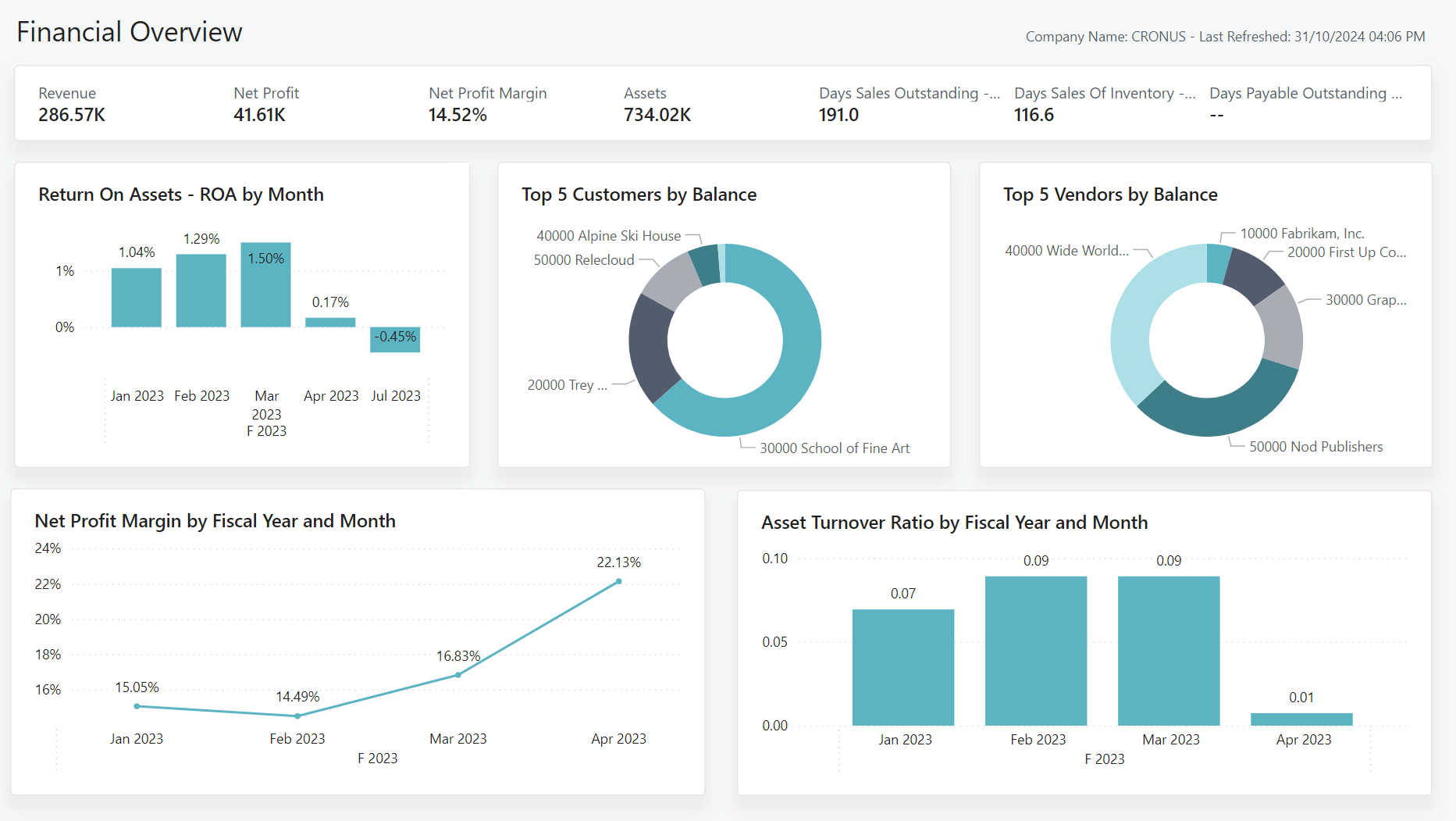
- Item insights with advanced KPIs and summary — Copilot now generates natural-language summaries of inventory performance, turnover and margin, giving non-technical users insight without having to build Power BI reports
- Review content generated by agents directly on pages — the agent’s suggestions and reasoning are visible inline, so reviewers understand why a line was coded to a particular account
- Avatars for record creators and modifiers — at a glance, you can see whether a record was created by a human or an agent. This is a small change with significant audit implications
- Stop all active tasks for a selected agent — essential “kill switch” capability for supervisors
2. Accounts Payable: The Long-Overdue Overhaul
If you’ve worked with Business Central (or NAV before it) for any length of time, you’ll know there have been a handful of persistent frustrations in the purchase-to-pay process. Release 28 addresses several of them in one go.
Match Purchase Invoices to Multiple Order and Receipt Lines
This is possibly the most practically useful change in the entire release for AP teams. Previously, if a vendor invoice covered multiple purchase orders — a common scenario with large suppliers or consolidated monthly billing — you had to either create multiple purchase invoices or use awkward workarounds. With release 28, a new Get Order Lines action lets you pull lines from multiple orders and multiple posted receipts into a single invoice, with the system tracking the matched quantities at line level via new Matched Invoice Lines and Matched Order Lines fields.
The standard three-way match is preserved and strengthened, but the rigidity is gone. Note that there are some restrictions: the feature doesn’t currently apply to orders with prepayments, item charge lines, project-linked orders, subcontracting, blanket orders, or intercompany transactions. For most standard trading relationships, though, this is transformational.
What’s interesting strategically is that this feature essentially brings the base ERP up to parity with what the Payables Agent was already capable of doing — meaning manual AP clerks now have the same flexibility that the AI has.
Approval Workflows for Requisition and Item Journals
Finance functions have asked for this for years. Requisition worksheets, planning worksheets and item journals can now be routed through formal approval workflows, bringing them into line with the approval governance already available for purchase orders, sales documents and journals. For organisations with segregation-of-duties requirements, or those preparing for external audit under ISO 27001, SOC 2, or similar, this closes a real control gap.
Drop Shipment Improvements
Release 28 delivers three meaningful changes to drop shipment processing:
- Create purchase orders from drop shipments — including proper integration with the Order Planning page and a dedicated Drop Shipment action group on the Planning Worksheet
- Post purchase invoices for drop shipments independently of related sales invoices — previously, you couldn’t invoice the vendor until you’d invoiced the customer, which could force awkward cash-flow-damaging sequencing. That constraint is gone
- Reverse drop shipments when neither sales nor purchase documents are invoiced — a much-needed correction mechanism for when things go wrong
One important note for technical teams: the change to drop shipment posting logic removes some checks that previously blocked purchase invoice posting. If you have customisations or third-party extensions that hook into drop shipment events, these should be reviewed before you update production environments. This is exactly the kind of impact assessment we build into every upgrade project.
Filter Receipt and Shipment Lines to Find Invoicing Candidates
A small but genuinely useful quality-of-life improvement: the Get Receipt Lines and Get Shipment Lines dialogs now let you filter down to the lines you actually want to invoice. For AP teams processing high volumes, this saves real time.
3. Financial Reporting, Governance and the Auditor’s View
If you’re a CFO or financial controller, this section matters more than the headline-grabbing AI features. Release 28 delivers a set of capabilities that finally make Business Central properly audit-ready.
Financial Reporting Enhancements
The Financial Reporting module — which replaced the legacy Account Schedules — gains several maturity features: audit logs for financial report definitions, lifecycle status (draft vs published) on report definitions, and smarter defaults on the card page. What this means in practice is that you can now treat your statutory and management account definitions as versioned, governed artefacts rather than ad-hoc spreadsheet-equivalents. Kennie Pontoppidan, a Microsoft Principal PM and long-standing figure in the BC finance community, has been previewing these with the Financial Reporting Heroes group and the feedback loop shows.
Control the Lifecycle of Report Layouts
Similarly, report layouts (the visual presentation of documents and reports) now have proper lifecycle states, so you can manage which layouts are available for selection, retire old versions cleanly, and ensure users can only pick from approved options. Small change, significant governance implications.
Set Default Language for Documents at Company Level
For multi-entity organisations operating across jurisdictions, you can now set the document language per company. This addresses a long-standing pain point for groups where different trading entities sit in different linguistic regions — particularly relevant for UK groups with Irish, French or German subsidiaries.
New APIs for Auditors
Release 28 delivers two new API sets specifically designed for auditors and IT staff:
- APIs for analysing user and group permissions across apps — cross-cutting visibility of who can do what, across the whole environment
- APIs for analysing approval workflows — full programmatic access to workflow definitions, states and histories
These are purpose-built for the kind of evidence auditors request during ISAE 3402 or SOC reporting, and they remove a huge amount of friction from the annual audit cycle. If your external auditors currently take days to walk through your authorisation matrix, these APIs reduce that to hours.
Track Changes Done Through the User Interface
This is a Feature Update that can be enabled via Feature Management, and it’s a very big deal. Changes made through the UI — the kinds of changes that previously required custom change-tracking extensions — are now captured natively. For any organisation concerned about fraud detection, segregation of duties, or simply wanting to reconstruct “who changed what, when, and why,” this is foundational.
Enhanced Subscription Billing Power BI App
For clients on recurring-revenue models — and that’s a growing proportion of our customer base — the Subscription Billing Power BI app has received meaningful enhancements. MRR, ARR, churn analysis, deferred revenue recognition views: all more sophisticated out of the box.
4. Governance, Administration and the Migration Path
Migrate to the Cloud from Any SQL Database (Public Preview)
This deserves its own section, because it is genuinely strategic. Until now, the cloud migration tooling in Business Central was primarily aimed at Dynamics GP, NAV and on-premise BC customers. With release 28, in public preview, Microsoft has introduced a migration path that works from any SQL database.
What this means: if you’re on Sage 200, Sage 300, Sage Intacct, a bespoke SQL-based ERP, or any legacy system that stores its data in Microsoft SQL Server, there is now a supported path into Business Central cloud. This is a materially different proposition from the previous state, where migrations from non-Microsoft ERPs required substantial bespoke integration work.
We’ll come back to what this means for migrations from Xero, Sage and AccountsIQ specifically later in this post.
Audit User and Group Permissions Across Apps
Now generally available, this provides a single view of effective permissions across the entire Business Central tenant — including permissions granted by installed apps and extensions. For IT and finance governance teams, the days of trying to mentally reconcile permission sets across multiple apps are over.
Manage Database Index Usage and Cost per Company
A technical feature with financial implications: administrators can now view which indexes are being used, and which aren’t, and turn off unused indexes. In a multi-company environment, the database performance and cost savings can be substantial. For clients on the higher-tier Business Central subscriptions, this is real money.
Connect AI Agents to the Admin Center via MCP Server (Preview)
The Model Context Protocol (MCP) Server extends to the Business Central Admin Center, meaning you can orchestrate admin tasks — provisioning sandboxes, scheduling updates, managing environments — via AI agents. For partners and managed service providers like us, this changes how we deliver managed services at scale.
5. Supply Chain, Quality and E-Commerce
Quality Management (Public Preview)
After years of waiting, Business Central finally has native Quality Management. The Evaluate the Quality of Goods and Materials feature enters public preview, delivering inspection plans, quality tests, and non-conformance handling. For manufacturing and distribution clients, this removes the need for a third-party quality module or complex spreadsheet-based processes.
Item Attributes for Variants and Variant Images
Retail and e-commerce clients gain the ability to define item attributes at the variant level (not just the parent item), and to attach pictures to item variants. Combined with the Shopify connector enhancements — including product options based on item attributes, custom collections, variant image sync, and checkout currency handling — this makes Business Central meaningfully more competitive as an e-commerce back-end.
Purchase Quotes for Contacts
You can now create purchase quotes against a contact (rather than requiring a fully set-up vendor first). For procurement teams running competitive tenders, or for organisations sourcing from prospective suppliers, this is a material workflow improvement.
Manufacturing Usability Improvements
Release 28 brings a cluster of manufacturing improvements under the banner of “Experience improved usability in manufacturing.” These are incremental but add up: clearer production order status visibility, better handling of subcontracted operations, and improved routing maintenance.
6. Country and Regional, Electronic Documents
For UK clients, the most relevant international changes are around e-invoicing interoperability — the Set up Service Participants to Company Information feature (public preview) and Set a default e-document type on vendor templates (GA) both strengthen Business Central’s Peppol and UBL compliance. This matters for UK businesses trading into the EU, where mandatory e-invoicing is expanding across multiple jurisdictions.
The Link inbound e-documents to purchase invoices feature closes the loop: an inbound e-invoice (from Peppol, for example) is now directly linkable to the resulting purchase invoice, maintaining a clean audit trail from digital receipt through to posting.
How Finsys Apps Helps Existing Business Central Clients Adopt Release 28
For our existing clients, the question isn’t whether to adopt these features — Microsoft’s continuous update model means most will arrive in your environment automatically between April and September 2026. The question is which features to prioritise, how to configure them safely, and how to extract measurable value.
Our approach to release adoption breaks down into four phases:
Phase 1: Impact Assessment
Before you enable anything, we run a structured impact assessment against your specific environment. This covers: which mandatory features are changing (release 28 includes several features transitioning from optional to mandatory — including the new sales pricing experience, G/L currency revaluation, and enhanced Tell Me functionality); which customisations or third-party apps might be affected by the underlying platform changes (the drop shipment posting logic change is a classic example); and which new features will deliver measurable ROI for your business.
Phase 2: Sandbox Configuration and Testing
We use your sandbox environment to configure new features, run realistic test scenarios with your data, and validate that workflows behave as expected. For the Payables Agent specifically, this phase includes setting up the dedicated shared mailbox, configuring the agent’s instructions to match your invoice coding conventions, and establishing the supervisor review workflow.
Phase 3: Training and Change Management
New features only deliver value if your team actually uses them. We deliver targeted training — not generic product walkthroughs — focused on the specific features you’ve chosen to adopt. For AI agent features, this includes practical guidance on when to trust the agent, when to intervene, and how to structure instructions when the agent needs help.
Phase 4: Measurement and Iteration
We set KPIs up front — invoice processing time, touches per invoice, month-end close duration, audit evidence preparation time — and measure the delta after adoption. This is how we demonstrate ROI, and equally importantly, how we identify where further optimisation is worthwhile.
How Finsys Apps Helps New Clients Migrate from Legacy Systems
Release 28’s new cloud migration capabilities — specifically the Migrate to the cloud from any SQL database feature — change the calculus for organisations currently running Xero, Sage, AccountsIQ or other legacy finance systems. Here’s how we approach each of the most common migration scenarios we see.
Migrating from Xero
Xero is an excellent tool for small businesses — but we typically see clients outgrow it somewhere between £5m and £20m of turnover, or when they cross one of several complexity thresholds: multi-entity consolidation, multi-currency at scale, inventory-heavy operations, project accounting, or serious approval workflow requirements.
Our Xero-to-Business Central migration methodology leverages Xero’s API to extract master data (chart of accounts, customers, vendors, items, opening balances) and transactional history. We map the data into Business Central’s richer dimensional model, which is a step up from Xero’s tracking categories — giving you dimensional analysis of the kind that would require multiple Xero add-ons to approximate. With release 28’s enhanced analytics and the improved Subscription Billing Power BI app, clients coming from Xero typically find the reporting leap is the most immediately valuable benefit.
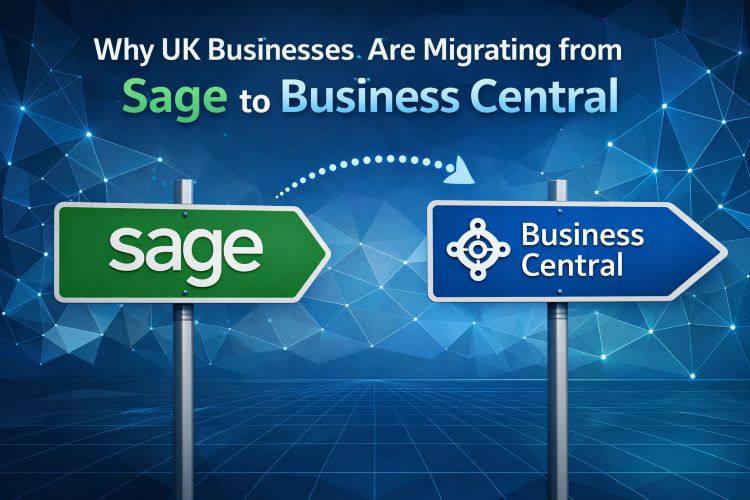
Migrating from Sage
Sage comes in many flavours — Sage 50, Sage 200, Sage Intacct, Sage X3 — and each requires a slightly different approach. For Sage 50 clients, migration is typically driven by growth, multi-entity requirements, or the need for proper workflow automation. For Sage 200, the driver is often a desire to move off on-premise infrastructure, combined with Sage’s uncertain long-term product roadmap relative to Microsoft’s heavy investment in Business Central. For Sage Intacct, the driver is usually a need for deeper operational integration — inventory, manufacturing, project accounting — that Intacct’s pure-finance architecture doesn’t serve well.
With release 28’s new SQL migration tooling, clients on on-premise Sage 200 have a genuine, supported migration path that previously required substantial bespoke ETL work. We combine the Microsoft tooling with our own migration accelerators to handle the areas the tooling doesn’t cover — particularly nominal ledger mappings, customised report definitions, and the historical analysis data that finance teams actually care about retaining.
Migrating from AccountsIQ
AccountsIQ has found a strong niche in UK mid-market — particularly amongst multi-entity groups that outgrew Xero but weren’t ready for a full ERP. The usual catalyst for moving to Business Central is when AccountsIQ’s operational capabilities (inventory, procurement, project management, manufacturing) become limiting, or when the group wants to consolidate onto a single Microsoft-centric stack that integrates cleanly with Power BI, Power Automate, Teams and the broader Microsoft 365 ecosystem.
We’ve handled several AccountsIQ migrations, and the pattern is consistent: the financial data itself migrates cleanly, and the real work is in redesigning the operational processes that AccountsIQ handled externally (typically via Excel or bolt-on tools) to run natively in Business Central. Release 28’s improvements to approval workflows, requisition management, and Copilot-driven insights mean the post-migration environment is meaningfully richer than what clients left behind.
Why Now is the Right Time
Three reasons to move sooner rather than later:
- The AI advantage compounds. The Payables Agent is already saving our clients real money. Every month you delay is a month of manual processing cost that you won’t recover
- The migration tooling has matured. Release 28’s SQL migration capability means projects that would have cost 30–40% more in bespoke ETL two years ago are now well-trodden territory
- Microsoft’s investment trajectory is clear. Business Central is receiving more engineering investment, more frequently, than any competing mid-market ERP. Legacy systems are increasingly in maintenance mode rather than being actively developed
The Finsys Apps Difference
Business Central is a powerful platform, but the reality is that the difference between a successful implementation and a frustrated one is rarely the software — it’s the partner. What we bring to both release adoption and migration projects is a combination of:
- Finance-first thinking. We come from finance backgrounds ourselves. We speak your language, we understand your control requirements, and we build systems that make your month-end faster rather than more complicated
- A hands-on approach. Our founder Matthew Cooke is personally involved in every engagement. You’re not handed off to an offshore delivery team
- Proven methodology. Detailed planning, thorough testing, phased rollout, measurable outcomes. No surprises at go-live
- Long-term partnership. We don’t disappear after go-live. Our managed services capability means we’re there for the next release, the next business change, the next growth phase
Ready to Explore What Release 28 Means for You?
Whether you’re an existing Business Central client looking to prioritise which release 28 features to adopt, or you’re evaluating a move from Xero, Sage or AccountsIQ, we’d welcome the conversation. We offer a free half-day consultation — a structured session where our experts review your current systems, processes and priorities, and give you a concrete, actionable view of the opportunities in front of you.
Get in touch with Finsys Apps and let’s talk about how release 28 can move your finance function forward.
This post reflects the features detailed in Microsoft’s Business Central Update 28.0 release documentation as of the general availability date in April 2026. Some features remain in public preview and may evolve before full rollout. If you are a client of Finsys Apps, always consult us before enabling preview features in a production environment.